PERMIT CHECKLIST
Septic permit readiness checklist for contractors
SepticPro turns permit preparation into a checklist-driven workflow so contractors can track forms, fees, drawings, contacts, setbacks, soil notes, and required attachments.
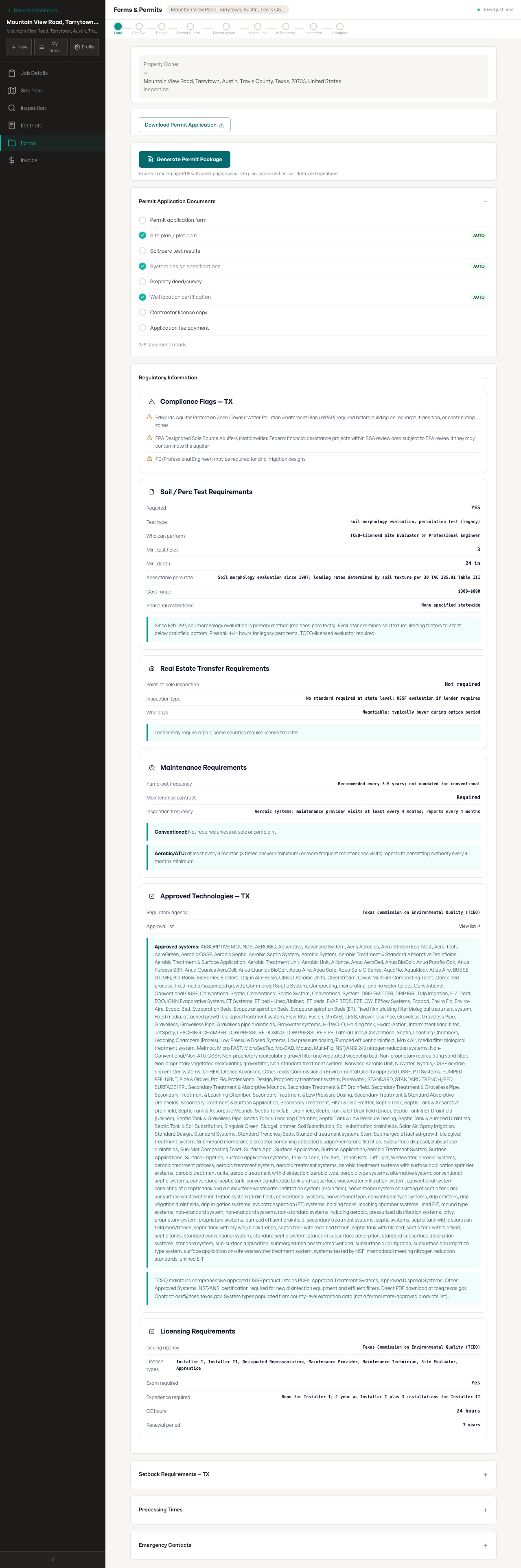
Actual permit workflow screenshot
The permit screenshot shows checklist rows, generated packet controls, and regulatory sections visible in the product.
- Checklist rows
- Application, plot plan, soil results, specs, well certification, license, and fees
- Regulatory sections
- Compliance flags, soil/perc, transfer, maintenance, technology, licensing, setbacks, and processing
- Limit
- County completeness varies; unclear requirements still need verification
What this page covers
- Track the required application, site plan, fee, soil or perc information, and local contact.
- Keep permit status visible for the office and field.
- Reduce rejected packets caused by missing attachments.
- Turn repeat county work into a consistent process.
Search topics
- septic permit checklist
- septic permit software
- county septic requirements
Related septic contractor workflows
Frequently asked questions
Can it track county-specific permit requirements?
Yes. That is the point of the workflow: connect the job with available county rules, forms, fees, and health department contacts.
What if requirements are unclear?
The app should surface uncertainty instead of hiding it, so the contractor can verify before submitting.